
Before you start
iCompaas audits Railway through its public GraphQL API (backboard.railway.com/graphql/v2) using an API token you create in the Railway dashboard. One thing to understand up front: Railway tokens have no read-only mode. Unlike the AWS auditor role, the Azure custom role or the GCP Viewer service account, a Railway token can do anything its scope allows — including reading environment variables in plaintext. Create the narrowest token that covers what you want audited, and treat it like a production secret.
Step 1 — Create a scoped token
- Open the tokens page in your Railway account settings (
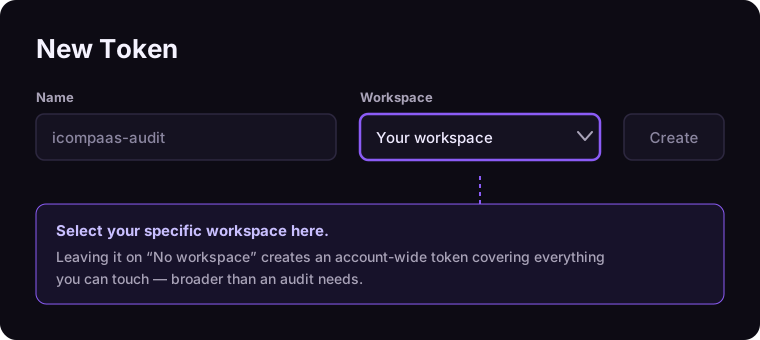
railway.com/account/tokens). - In the workspace dropdown, select the specific workspace you want audited. This creates a workspace token limited to that workspace's resources — do not pick No workspace, which creates an account-wide token covering everything you personally can touch.
- Name the token so its purpose is obvious (e.g. icompaas-audit) and create it. Copy the value — Railway shows it once.
Auditing a single project instead? Create a project token from the tokens page in that project's settings — it is scoped to one environment within one project, the tightest scope Railway offers.
Step 2 — Save the account in iCompaas
- In the app, open Onboarding → Cloud onboarding → Railway.
- Enter a memorable Cloud name (e.g. Prod Railway) and paste the token.
- Click Save & start scan. Initial checks start immediately and the account appears in your Cloud Account list.
What iCompaas evaluates
- Service configuration — start/build commands, health-check paths, replica counts, restart policies and resource limits per service instance.
- Deployment discipline — deployment history and statuses per environment, evidence of how changes reach production.
- Domains & TLS — custom domains, DNS status and certificate state (pending / issued / failed).
- Volumes & backups — volume sizes, mount paths, and backup schedules.
- Access posture — workspace members and their roles (Admin / Member / Deployer) and project-level roles, so over-privileged accounts surface in your reports.
- Audit trail — Railway's audit log (who did what, when). Note retention is plan-dependent on Railway's side: 48 hours on Free/Hobby, 30 days on Pro, 18 months on Enterprise.
Good to know
- Rate limits: Railway allows 100 (Free), 1,000 (Hobby) or 10,000 (Pro) API requests per hour. iCompaas paces its scans to stay inside your plan's budget; very large workspaces on small plans may scan more slowly.
- Rotating the token: delete it from the Railway tokens page and add a fresh one in iCompaas — scans resume with the next run.
- Least privilege: consider creating the token from a Railway user with the narrowest role that still sees the audited resources, rather than a workspace admin.
Troubleshooting
- Scan sees nothing / missing projects — the token's workspace doesn't contain them, or a project token was used where a workspace-wide audit was expected.
- Scans stall partway on a large workspace — likely the hourly rate limit on Free/Hobby plans; they resume automatically.